

tW: Procrastination Field Notes
48-hour self-study: log your work, code three triggers, write a one-page memo.
Your Procrastination, Studied by You
This edition of thesify Weekly examines procrastination as data, the small drifts that redirect your attention without moving a draft forward. Rather than a personal flaw, you will treat these moments as patterns with cues, contexts, and rewards that can be named and changed. This week’s blog article, Overcome Thesis Procrastination & Finish Your Thesis on Time, provides the framework for restarting stalled work and finishing on schedule. Plus, inside this newsletter you will find a 48-hour field log, a simple coding rubric, and a memo scaffold that turns your observations into next steps in thesify.
This Week at thesify: Chat with Theo in Your Draft
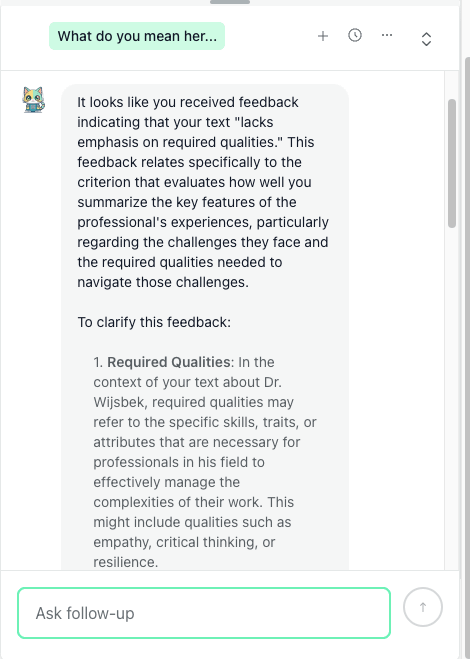
You can now chat with Theo directly inside thesify. Ask clarifying questions about feedback, request concrete examples, or turn a comment into a step-by-step revision plan, all beside your document so you can edit and verify changes without switching tools. The chat is available to all subscribers.
Try it: open any draft in thesify and click New conversation in the bottom right corner.
How it works, in one glance:
See chat next to your draft
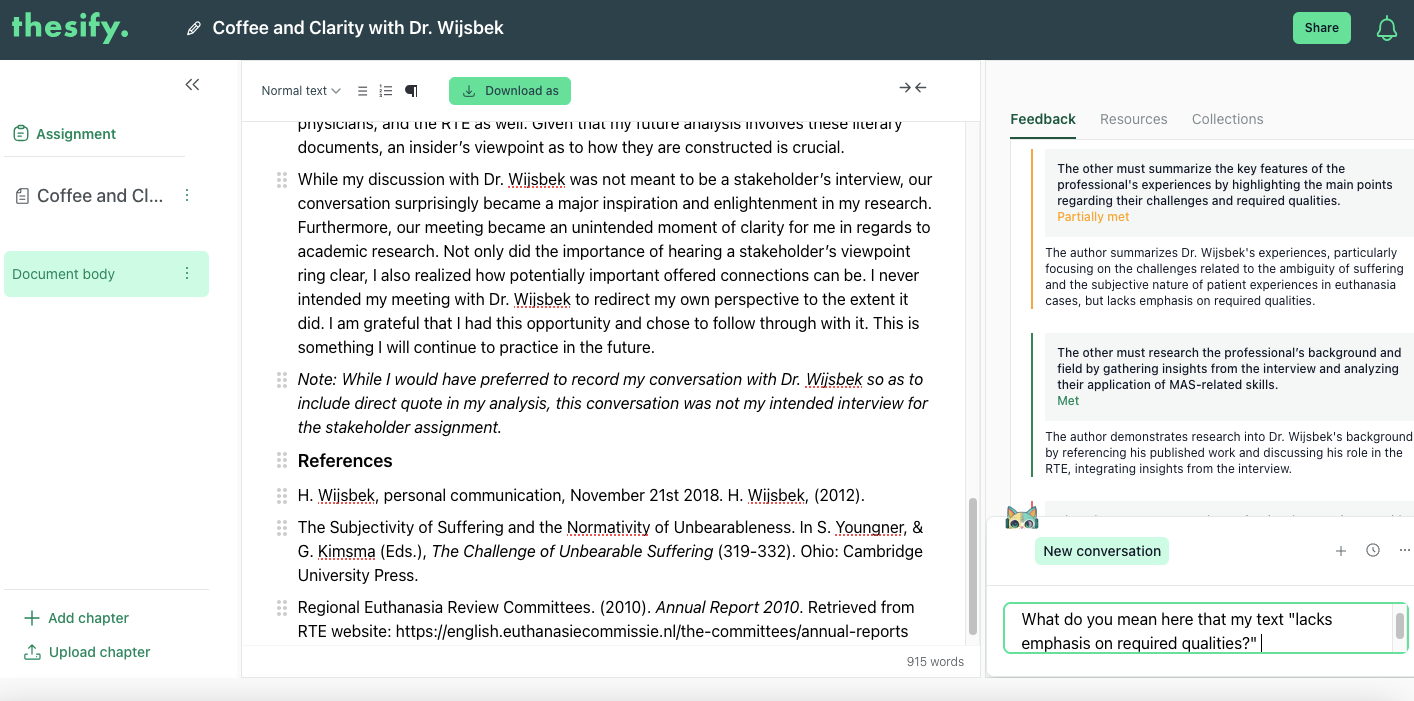
Ask Theo a question, for example to clarify a piece of feedback
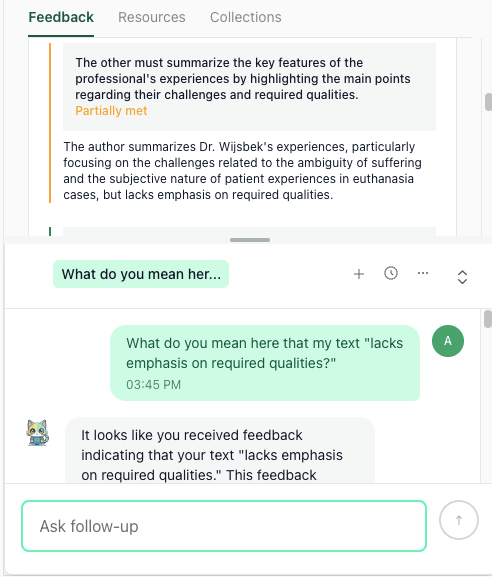
Get a detailed response with structured suggestions you can act on
This Week’s Blog: Overcome Thesis Procrastination & Finish Your Thesis on Time
When your thesis stalls, you do not need more time, you need a plan you can follow today. This post shows you how to set small daily targets, outline what to write next, draft before you edit, and use thesify to turn pages into a coherent chapter.
Your Weekly Tips: Observe Your Delay Habits Like a Researcher
Treating delay as data replaces self-critique with testable causes. By naming cues, contexts, and rewards, you move from “I procrastinate” to specific patterns you can change. The result is targeted effort, less friction, and more time spent on paragraphs that move your argument forward.
Keep a 48-hour field log
Use this blank line for every drift. Keep entries factual and under 20 seconds.
Template:
Time: ___ | Cue: ___ | Context: ___ | Intended task: ___ | Drift: ___ | Reward sought: ___ | Duration (min): ___ | Code: ___
Sample entries:
Time: 09:12 | Cue: got reviewer email | Context: library desk | Intended task: results paragraph 2 | Drift: opened email, skimmed threads | Reward sought: relief from uncertainty | Duration: 15 | Code: Uncertainty
Time: 13:47 | Cue: phone buzz | Context: home office | Intended task: methods edit | Drift: Instagram scroll | Reward sought: novelty | Duration: 11 | Code: Novelty
Time: 20:05 | Cue: thought of “cleaning up” | Context: kitchen table | Intended task: outline discussion | Drift: renamed PDF files | Reward sought: easy progress | Duration: 22 | Code: Logistics
Code with a three-trigger rule
Create a tiny codebook. Each log takes exactly one code. If an entry does not fit, refine definitions, not the data.
Template:
TRIGGER: [name]
Definition: …
Include when: …
Exclude when: …
Example: …
Sample codebook:
TRIGGER: Uncertainty
Definition: Switching tasks when the next step feels unclear.
Include when: you reread notes, open many tabs, rewrite a prompt without acting.
Exclude when: you must check a source to proceed.
Example: meant to write results, opened five methods papers instead.
TRIGGER: Novelty
Definition: Seeking stimulation through feeds, chats, or news.
Include when: any social or news during planned work.
Exclude when: you open a source directly relevant to the current paragraph.
Example: mid-paragraph, opened Instagram and scrolled.
TRIGGER: Logistics
Definition: Low-impact admin used to postpone hard work.
Include when: renaming files, tweaking formatting, tidying folders.
Exclude when: required submission checks.
Example: reorganized references before drafting.
Find the hotspot before you fix it
Use your log to choose one hotspot, then commit to one precise intervention for the next two or three sessions. Track a single metric (minutes to first sentence, lines drafted, citations verified), write a short memo on what changed, and schedule the next step so tomorrow starts on rails. Keep your codebook steady for a week, then adjust only if entries consistently do not fit.
Tally entries by time block and task type, then pick the single cell with the most logs. Write one hypothesis and one precise intervention to test.
Template:
Hotspot: [time block] during [task type] has [N] logs, mostly [trigger].
Hypothesis: I drift here because [reason you can test].
Intervention to test next session: [one precise change].
Start condition: [what is on screen].
Finish condition: [clear stop line].
Sample:
Hotspot: 13:00–15:00 during drafting has 6 logs, mostly Novelty.
Hypothesis: energy dip and vague next step trigger scrolling.
Intervention: open to results paragraph 2 with a one-sentence target, start with two figure captions, phone in another room.
Start condition: document open at results paragraph 2, caption stub pasted.
Finish condition: two captions and four sentences added.
Write a memo
At the end of Day 2, write a brief memo and set one concrete next step for tomorrow.
Template:
Title: Procrastination field notes, 48-hour memo
Pattern: …
Hypothesis: …
Intervention tested: …
Result metric: …
Next step: …
Sample memo (about 130 words):
Title: Procrastination field notes, 48-hour memo
Pattern: Most drifts occur 13:00–15:00 while drafting results. Dominant trigger is Novelty, 6 of 11 logs.
Hypothesis: I scroll when the next sentence is vague and energy is low after lunch.
Intervention tested: Begin with two figure captions, paste a one-sentence target for the paragraph, place phone in another room.
Result metric: Minutes to first sentence and sentences produced in 25 minutes. With intervention, first sentence at 3 minutes and 9 sentences drafted. Without intervention, first sentence at 11 minutes and 3 sentences drafted.
Next step: Add a calendar reminder for tomorrow at 13:00 with the one-sentence target and figure numbers.
You are “done” for this cycle when you can state your dominant trigger and hotspot in one sentence, name the intervention you will keep using, and show a small improvement on your metric. Carry that intervention into next week and select a new hotspot when the current one stabilizes.
Related Resources
How I graduated using thesify AI (Podcast): In our recent podcast conversation, Fanny, a master’s student in luxury marketing, described how she navigated thesis completion difficulties. Fanny’s journey shows what is possible: she moved from weeks of delay and uncertainty to completing a clear, well-structured project that earned top marks. Her story is a reminder that the struggles you may face are not signs of failure but common steps on the path toward completion.
thesify Weekly Newsletter Archive: Explore past editions of our newsletter, where each week we examine the craft of academic writing through concrete strategies, revision techniques, and research practices. Revisit earlier issues to trace themes in depth or catch up on insights you may have missed in our Substack archive.
How to Improve Your Thesis Chapters Before Submission: In this guide for graduate students, you’ll learn 7 steps from refining your thesis statement and chapter goals to final proofreading, formatting, and academic integrity checks. Find out how to use thesis statement feedback AI and how to achieve academic rigor throughout your thesis by ensuring your thesis statement, main research question, and arguments are solid.
The Best AI Tool for Master’s Students: Trusted Support for Writing and Research: Master’s programs are rigorous, demanding not just advanced research and writing skills but also the ability to navigate complex academic expectations. Between balancing coursework, thesis deadlines, and professional aspirations, finding tailored support can feel impossible. That’s why thesify isn’t just an AI tool—it’s your academic ally, designed to meet the unique challenges of master’s students. In this post, learn how thesify helps you move beyond the classroom and prepares you for academic and professional success by addressing career-critical tasks.
Like getting a professor’s feedback exactly when you need it.
Theo, thesify’s AI assistant, acts like an attentive mentor, providing targeted feedback on your draft. Whether your argument is unclear or your structure needs refinement, Theo highlights the areas that require attention and offers actionable suggestions to improve. Upgrade today to receive your Pre-submission Review.
Need more insights? Visit our full blog archive or newsletter archive for expert advice on academic writing.
Until next time,
The thesify Team